By Milan Saxena
After you read this article, you will find out:
- Free Online Resume Builder Comparison Table.
- Top 5 Free Online Resume Makers.
- The Most Favorite Free Online Resume Maker for Other People.
- Related Useful Resume Resources.
Is There any Good Free Online Resume Maker?
Are you looking for a good free online resume maker which can help you to write a winning resume? This page is right for you, if the answer is yes. There are many online resume creator tools available for you to use for free of charge. In the following table, you will find the top 5. First, I would like you to see what all inside the service. Let see a quick overview:
Many people asked me about free online resume creator such as: Is it allows me to post resume online? Are there many templates available in the tool? What type of file format can I export? And so on. From one to another service is not equal. There are differences in both features and interface. Let me provide you some highlights. Free online resume makers like VisualCV and Emurse allow you not only creating resume but also posting your resume online as web page where you can decide who gets to see it.
Regarding to template, there are not so many of them available comparing to desktop resume writing software. But you will find commonly used and standard template. Most of the tool allows you to download your resume in PDF and Text file format, some available in more formats like Doc and Html. Some tools such as JobSpice and Resumizer allow you to create a resume even without registration or having an account at its website.
With resume wizard in the tools, you just answer the questions and fill out your information into the right box. Then follow few more steps, the final resume is created. That is sound simple and easy. Yes it is. But it is not mean that your resume is a winning one. To make a winning resume I recommend you to read this
How to Write a Winning Resume in 9 Steps?. Now I hope you get some ideas.
Free Online Resume Builder Comparison Table
The following is a fundamental comparison table of free online resume creators.
Top 5 Free Online Resume Makers
The following is a list of top free online resume makers which have been carefully selected.
VisualCV is a unique free online resume maker tool. With this tool you can create a resume and make it comes alive in three steps: create, enrich and share. Create: you can create a VisualCV by cutting and pasting from your existing resume in Word, PDF or plain text format. Right away, your resume becomes a live Internet document. Enrich: You can easily enrich your VisualCV, making it a proxy for that first interview. Add one or more video clips that answer standard questions, or perhaps address that awkward gap in your resume. Attach writing samples or your scanned diploma and more. Share: You decide who gets to see your VisualCV. Share it with your professional social network, or in their database of employers who each have their own company. Unlike an emailed resume, you have complete control over who can access your VisualCV.
You can use your VisualCV for professional networking, job searching, business development, and personal brand management. The VisualCV Portfolio lets you easily add and manage your work samples, images, videos, media coverage, diplomas, certificates, or other interesting details about you to enhance your VisualCV.
JobSpice is an easy to use free online resume maker. You can create your resume for free in just several minutes with or without registration. As a registered user, you can save and share your resume online. Without registration, you can only create and export your resume into PDF, but you cannot save and share it online.
The process is simple. First, add desired section to your resume page (including Contact Info, Objective, Education, Coursework, Experience, Achievements, Affiliations, Skills, Publications and Custom Section). Then fill out the information into the box. Next, you can choose style for your resume including Cardinal, Brown, Impossible Is Nothing, Green and Simpme, Taleen, Titan, Derivative and more. Then take a preview of your resume. Last step is to save, print, share or export as pdf.
You can create share and store your resume online for free with Emurse.com. It allow you to create multiple resumes quickly and easily, safely and securely store your resume, have your resume available whenever you need. Emurse also helps you keep track of both online and offline resume distribution as well as keep notes and set statuses for each event and allows you to set follow up reminders to keep you on task. Additional, it allows you to turn your resume into a website with privacy controls and advanced stats. To use the service, you need to create an account at it official website.
HowToWriteAResume.NET provides an online resume builder solution. You can create a professional resume much faster by using Automatic Templates, PhraseBuilder Technology, Step by Step Instructions, Easy Formatting and Export and Integrated Job Search. There are both free and premium memberships. With free membership, you can create a resume with standard template and can download it as html or txt file format. You do not need to pay anything to print; you can print directly from the format page.
For more features, you have the option of upgrading to premium for a one-time fee. You will have access to more advanced resume templates, more phrase builder templates, the ability to export to doc, docx, PDF, and Open Document formats.
Resumizer is free online resume creator which allows you to create a resume with or without having an account at its official website. This resume wizard allows you to format your resume with font type, size and color. The creation process is straightforward. You just need to follow the step by step resume wizard. There are several resume styles available for you to choose. After complete writing, you can download your resume into several formats including PDF, HTML and Text. Without membership, none of your info is stored in the system. With free membership, the benefit is easier editing as your information will be stored in the system allowing you to login to edit your resume.
Category:
By Milan Saxena
Introduction
In my earlier article we have discussed about the SQL Server schema comparison tool in Visual Studio 2010 http://www.dotnetfunda.com/articles/article1121-sql-server-schema-comparison-tool-in-visual-studio-2010-.aspx. Today in this article I’m going to explain yet another new tool in Visual Studio 2010 which is nothing but the DATA COMPARISON tool. This tool is of extreme use for the developers to compare data in 2 tables in different environment (in real time say a reference table data should be compared from Development to Production).
Many third party software’s available in market which servers the same purpose for comparing the data between the environments, but with Visual Studio Microsoft has given this functionality inbuilt as a comparison tool so that Visual Studio emerges as a bundled product which servers most of the development tasks and day to day activities which the developers and DBA’s required to do. Microsoft Database server version for Database administrators and developers has provided with many features like database development, version controlling, unit testing, code analysis, code maintenance etc…
Availability
Microsoft has provided option in Visual Studio 2010 to compare the data for SQL Server 2005 and 2008 versions, since SQL Server 2000 support is not provided by Microsoft this version is not included with VS 2010. So both SQL Schema Comparison and Data Comparison are supported for SQL Server 2005 and 2008 versions. These tools are available for the licenses with Visual Studio Premium and Visual Studio Ultimate versions and not available for the Visual Studio Professional version.
Let’s jump into the demonstration on how to use the Visual Studio 2010 Data Compare tool; I’m taking Sql server database data comparison. Let’s see the step by step process on how to use this tool.
Step by Step Process
Step 1 – Open Visual Studio 2010 by moving to Start > Program > Microsoft Visual Studio 2010 > Microsoft Visual Studio 2010.

Step 2 – Once Visual Studio is opened, go to Data --> Data Compare --> New Data Comparison…

Step 3 – You will see a dialog box which requests for the source and destination db and the properties to connect to those db servers as below

Step 4 – Choose the source and the destination DB servers which you want to compare with. If you can see the above image, there are the options available for the comparison like Different Records, Only in Source, Only in Target, Identical Records. Based on the needs these options can be selected to make the comparison of the data. Once the options are selected click on the FINISH button, it will open a new screen.
Step 5 – The new window will show the list of tables and views in the Source/destination servers and the list of columns for each table. You have given the option to select the columns which needs to be compared. The main point to note down here is the tables to be compared needs to have a Primary or Unique Key by which the tool will make the comparison. So Select the list of tables and the constraints as per the requirement as shown in the below figure and click on FINISH button.

Step 6 – Once we click the FINISH button, the tool will start doing the comparison based on the selection we made and gets the result in a new windows as shown in the below image. The window has few sections which gives the user to make analysis of the data which are compared. The options which we gave at the step 3 are shown as output here. The window will have the Count of data difference in both the source and the destination, Count of data difference in source only, Count of data difference in destination only and finally the identical records in both the servers.

Step 7 – In the same window we have some useful information, and guess what are the information’s?? Yes the tool gives which are the difference in the data stored as per the selection we made in the step 3 as shown in the below image.

Step 8 – Finally in the same window we have some more set of information’s like the tool itself generates the insert and the update scripts to sync between the databases as shown in the below image.

Conclusion
This tool is really going to be more productive for the day to day activity of the developers and improves the productivity. Thanks to Microsoft for incorporating these tools into Visual Studio 2010.
Category:
By Milan Saxena
SQL SERVER – Index Created on View not Used Often – Limitation of the View 12: "
I have previously written on the subject SQL SERVER – The Limitations of the Views – Eleven and more…. This was indeed a very popular series and I had received lots of feedback on that topic. Today we are going to discuss something very interesting as well.
During my recent performance tuning seminar in Hyderabad, I presented on the subject of Views. During the seminar, one of the attendees asked a question:
We create a table and create a View on the top of it. On the same view, if we create Index, when querying View, will that index be used?
The answer is NOT Always!
(There is only one specific condition when it will be used. We will write about that later in the next post).
Let us see the test case for the same. In our script we will do following:
USE tempdb

GO

IF EXISTS (SELECT * FROM sys.views WHERE OBJECT_ID = OBJECT_ID(N'[dbo].[SampleView]'))

DROP VIEW [dbo].[SampleView]

GO

IF EXISTS (SELECT * FROM sys.objects WHERE OBJECT_ID = OBJECT_ID(N'[dbo].[mySampleTable]') AND TYPE IN (N'U'))

DROP TABLE [dbo].[mySampleTable]

GO

-- Create SampleTable

CREATE TABLE mySampleTable (ID1 INT, ID2 INT, SomeData VARCHAR(100))

INSERT INTO mySampleTable (ID1,ID2,SomeData)

SELECT TOP 100000 ROW_NUMBER() OVER (ORDER BY o1.name),

ROW_NUMBER() OVER (ORDER BY o2.name),

o2.name

FROM sys.all_objects o1

CROSS JOIN sys.all_objects o2

GO

-- Create View

CREATE VIEW SampleView

WITH SCHEMABINDING

AS

SELECT ID1,ID2,SomeData

FROM dbo.mySampleTable

GO

-- Create Index on View

CREATE UNIQUE CLUSTERED INDEX [IX_ViewSample] ON [dbo].[SampleView]

(

ID2 ASC

)

GO

-- Select from view

SELECT ID1,ID2,SomeData

FROM SampleView

GO
Let us check the execution plan for the last SELECT statement.

You can see from the execution plan. That even though we are querying View and the View has index, it is not really using that index.
In the next post, we will see the significance of this View and where it can be helpful.
Meanwhile, I encourage you to read my View series: SQL SERVER – The Limitations of the Views – Eleven and more….
Category:
By Milan Saxena
SQL SERVER – ORDER BY ColumnName vs ORDER BY ColumnNumber: "
I strongly favor ORDER BY ColumnName.
I read one of the blog post where blogger compared the performance of the two SELECT statement and come to conclusion that ColumnNumber has no harm to use it. Let us understand the point made by first that there is no performance difference.
Run following two scripts together:
USE AdventureWorks

GO

-- ColumnName (Recommended)

SELECT *

FROM HumanResources.Department

ORDER BY GroupName, Name

GO

-- ColumnNumber (Strongly Not Recommended)

SELECT *

FROM HumanResources.Department

ORDER BY 3,2

GO
If you look at the result and see the execution plan you will see that both of the query will take the same amount of the time.

However, this was not the point of this blog post. It is not good enough to stop here. We need to understand the advantages and disadvantages of both the methods.
Case 1: When Not Using * and Columns are Re-ordered
USE AdventureWorks

GO

-- ColumnName (Recommended)

SELECT GroupName, Name, ModifiedDate, DepartmentID

FROM HumanResources.Department

ORDER BY GroupName, Name

GO

-- ColumnNumber (Strongly Not Recommended)

SELECT GroupName, Name, ModifiedDate, DepartmentID

FROM HumanResources.Department

ORDER BY 3,2

GO

Case 2: When someone changes the schema of the table affecting column order
I will let you recreate the example for the same. If your development server where your schema is different than the production server, if you use ColumnNumber, you will get different results on the production server.
Summary: When you develop the query it may not be issue but as time passes by and new columns are added to the SELECT statement or original table is re-ordered if you have used ColumnNumber it may possible that your query will start giving you unexpected results and incorrect ORDER BY.
One should note that the usage of ORDER BY ColumnName vs ORDER BY ColumnNumber should not be done based on performance but usability and scalability.
It is always recommended to use proper ORDER BY clause with ColumnName to avoid any confusion.
Category:
By Milan Saxena
I'm always looking for ways to save time. Suppose I want to attach some files to an email, and I already have a folder open containing those files.
I used to have to click "Attach a file," find the photos, click them, etc. Starting today, if I'm using Google Chrome or Mozilla Firefox 3.6, I can just drag and drop the files to attach them — easy as pie.


We'll enable this for other browsers as soon as they support this feature. For now, you can drag and drop attachments in Chrome and Firefox only.
Category:
By Milan Saxena
What are the properties of the Relational tables?
Relational tables have six properties:
- Values are atomic.
- Column values are of the same kind.
- Each row is unique.
- The sequence of columns is insignificant.
- The sequence of rows is insignificant.
- Each column must have a unique name.
What is De-normalization?
De-normalization is the process of attempting to optimize the performance of a database by adding redundant data. It is sometimes necessary because current DBMSs implement the relational model poorly. A true relational DBMS would allow for a fully normalized database at the logical level, while providing physical storage of data that is tuned for high performance. De-normalization is a technique to move from higher to lower normal forms of database modeling in order to speed up database access.
How to get @@error and @@rowcount at the same time?
If @@Rowcount is checked after Error checking statement then it will have 0 as the value of @@Recordcount as it would have been reset.
And if @@Recordcount is checked before the error-checking statement then @@Error would get reset. To get @@error and @@rowcount at the same time do both in same statement and store them in local variable. SELECT @RC = @@ROWCOUNT, @ER = @@ERROR
What is Identity?
Identity (or AutoNumber) is a column that automatically generates numeric values. A start and increment value can be set, but most DBA leave these at 1. A GUID column also generates numbers, the value of this cannot be controled. Identity/GUID columns do not need to be indexed.
What is a Scheduled Jobs or What is a Scheduled Tasks?
Scheduled tasks let user automate processes that run on regular or predictable cycles. User can schedule administrative tasks, such as cube processing, to run during times of slow business activity. User can also determine the order in which tasks run by creating job steps within a SQL Server Agent job. E.g. Back up database, Update Stats of Tables. Job steps give user control over flow of execution. If one job fails, user can configure SQL Server Agent to continue to run the remaining tasks or to stop execution.
What is a table called, if it does not have neither Cluster nor Non-cluster Index? What is it used for?
Unindexed table or Heap. Microsoft Press Books and Book On Line (BOL) refers it as Heap.
A heap is a table that does not have a clustered index and, therefore, the pages are not linked by pointers. The IAM pages are the only structures that link the pages in a table together.
Unindexed tables are good for fast storing of data. Many times it is better to drop all indexes from table and than do bulk of inserts and to restore those indexes after that.
What is BCP? When does it used?
BulkCopy is a tool used to copy huge amount of data from tables and views. BCP does not copy the structures same as source to destination.
How do you load large data to the SQL server database?
BulkCopy is a tool used to copy huge amount of data from tables. BULK INSERT command helps to Imports a data file into a database table or view in a user-specified format.
Can we rewrite subqueries into simple select statements or with joins?
Subqueries can often be re-written to use a standard outer join, resulting in faster performance. As we may know, an outer join uses the plus sign (+) operator to tell the database to return all non-matching rows with NULL values. Hence we combine the outer join with a NULL test in the WHERE clause to reproduce the result set without using a sub-query.
Can SQL Servers linked to other servers like Oracle?
SQL Server can be lined to any server provided it has OLE-DB provider from Microsoft to allow a link. E.g. Oracle has a OLE-DB provider for oracle that Microsoft provides to add it as linked server to SQL Server group.
How to know which index a table is using?
SELECT table_name,index_name FROM user_constraints
How to copy the tables, schema and views from one SQL server to another?
Microsoft SQL Server 2000 Data Transformation Services (DTS) is a set of graphical tools and programmable objects that lets user extract, transform, and consolidate data from disparate sources into single or multiple destinations.
What is Self Join?
This is a particular case when one table joins to itself, with one or two aliases to avoid confusion. A self join can be of any type, as long as the joined tables are the same. A self join is rather unique in that it involves a relationship with only one table. The common example is when company have a hierarchal reporting structure whereby one member of staff reports to another.
What is Cross Join?
A cross join that does not have a WHERE clause produces the Cartesian product of the tables involved in the join. The size of a Cartesian product result set is the number of rows in the first table multiplied by the number of rows in the second table. The common example is when company wants to combine each product with a pricing table to analyze each product at each price.
Which virtual table does a trigger use?
Inserted and Deleted.
List few advantages of Stored Procedure.
- Stored procedure can reduced network traffic and latency, boosting application performance.
- Stored procedure execution plans can be reused, staying cached in SQL Server’s memory, reducing server overhead.
- Stored procedures help promote code reuse.
- Stored procedures can encapsulate logic. You can change stored procedure code without affecting clients.
- Stored procedures provide better security to your data.
What is DataWarehousing?
- Subject-oriented, meaning that the data in the database is organized so that all the data elements relating to the same real-world event or object are linked together;
- Time-variant, meaning that the changes to the data in the database are tracked and recorded so that reports can be produced showing changes over time;
- Non-volatile, meaning that data in the database is never over-written or deleted, once committed, the data is static, read-only, but retained for future reporting;
- Integrated, meaning that the database contains data from most or all of an organization’s operational applications, and that this data is made consistent.
What is OLTP(OnLine Transaction Processing)?
In OLTP – online transaction processing systems relational database design use the discipline of data modeling and generally follow the Codd rules of data normalization in order to ensure absolute data integrity. Using these rules complex information is broken down into its most simple structures (a table) where all of the individual atomic level elements relate to each other and satisfy the normalization rules.
How do SQL server 2000 and XML linked? Can XML be used to access data?
FOR XML (ROW, AUTO, EXPLICIT)
You can execute SQL queries against existing relational databases to return results as XML rather than standard rowsets. These queries can be executed directly or from within stored procedures. To retrieve XML results, use the FOR XML clause of the SELECT statement and specify an XML mode of RAW, AUTO, or EXPLICIT.
OPENXML
OPENXML is a Transact-SQL keyword that provides a relational/rowset view over an in-memory XML document. OPENXML is a rowset provider similar to a table or a view. OPENXML provides a way to access XML data within the Transact-SQL context by transferring data from an XML document into the relational tables. Thus, OPENXML allows you to manage an XML document and its interaction with the relational environment.
What is an execution plan? When would you use it? How would you view the execution plan?
An execution plan is basically a road map that graphically or textually shows the data retrieval methods chosen by the SQL Server query optimizer for a stored procedure or ad-hoc query and is a very useful tool for a developer to understand the performance characteristics of a query or stored procedure since the plan is the one that SQL Server will place in its cache and use to execute the stored procedure or query. From within Query Analyzer is an option called “Show Execution Plan” (located on the Query drop-down menu). If this option is turned on it will display query execution plan in separate window when query is ran again.
By Milan Saxena
What command do we use to rename a db?
sp_renamedb ‘oldname’ , ‘newname’
If someone is using db it will not accept sp_renmaedb. In that case first bring db to single user using sp_dboptions. Use sp_renamedb to rename database. Use sp_dboptions to bring database to multi user mode.
What is sp_configure commands and set commands?
Use sp_configure to display or change server-level settings. To change database-level settings, use ALTER DATABASE. To change settings that affect only the current user session, use the SET statement.
What are the different types of replication? Explain.
The SQL Server 2000-supported replication types are as follows:
- Transactional
- Snapshot
- Merge
Snapshot replication distributes data exactly as it appears at a specific moment in time and does not monitor for updates to the data. Snapshot replication is best used as a method for replicating data that changes infrequently or where the most up-to-date values (low latency) are not a requirement. When synchronization occurs, the entire snapshot is generated and sent to Subscribers.
Transactional replication, an initial snapshot of data is applied at Subscribers, and then when data modifications are made at the Publisher, the individual transactions are captured and propagated to Subscribers.
Merge replication is the process of distributing data from Publisher to Subscribers, allowing the Publisher and Subscribers to make updates while connected or disconnected, and then merging the updates between sites when they are connected.
What are the OS services that the SQL Server installation adds?
MS SQL SERVER SERVICE, SQL AGENT SERVICE, DTC (Distribution transac co-ordinator)
What are three SQL keywords used to change or set someone’s permissions?
GRANT, DENY, and REVOKE.
What does it mean to have quoted_identifier on? What are the implications of having it off?
When SET QUOTED_IDENTIFIER is ON, identifiers can be delimited by double quotation marks, and literals must be delimited by single quotation marks. When SET QUOTED_IDENTIFIER is OFF, identifiers cannot be quoted and must follow all Transact-SQL rules for identifiers.
What is the STUFF function and how does it differ from the REPLACE function?
STUFF function to overwrite existing characters. Using this syntax, STUFF(string_expression, start, length, replacement_characters), string_expression is the string that will have characters substituted, start is the starting position, length is the number of characters in the string that are substituted, and replacement_characters are the new characters interjected into the string.
REPLACE function to replace existing characters of all occurance. Using this syntax REPLACE(string_expression, search_string, replacement_string), where every incidence of search_string found in the string_expression will be replaced with replacement_string.
Using query analyzer, name 3 ways to get an accurate count of the number of records in a table?
SELECT *

FROM table1

SELECT COUNT(*)

FROM table1

SELECT rows

FROM sysindexes

WHERE id = OBJECT_ID(table1)

AND indid < 2
How to rebuild Master Database?
Shutdown Microsoft SQL Server 2000, and then run Rebuildm.exe. This is located in the Program Files\Microsoft SQL Server\80\Tools\Binn directory.
In the Rebuild Master dialog box, click Browse.
In the Browse for Folder dialog box, select the \Data folder on the SQL Server 2000 compact disc or in the shared network directory from which SQL Server 2000 was installed, and then click OK.
Click Settings. In the Collation Settings dialog box, verify or change settings used for the master database and all other databases.
Initially, the default collation settings are shown, but these may not match the collation selected during setup. You can select the same settings used during setup or select new collation settings. When done, click OK.
In the Rebuild Master dialog box, click Rebuild to start the process.
The Rebuild Master utility reinstalls the master database.
To continue, you may need to stop a server that is running.
Source: http://msdn2.microsoft.com/en-us/library/aa197950(SQL.80).aspx
What is the basic functions for master, msdb, model, tempdb databases?
The Master database holds information for all databases located on the SQL Server instance and is the glue that holds the engine together. Because SQL Server cannot start without a functioning master database, you must administer this database with care.
The msdb database stores information regarding database backups, SQL Agent information, DTS packages, SQL Server jobs, and some replication information such as for log shipping.
The tempdb holds temporary objects such as global and local temporary tables and stored procedures.
The model is essentially a template database used in the creation of any new user database created in the instance.
What are primary keys and foreign keys?
Primary keys are the unique identifiers for each row. They must contain unique values and cannot be null. Due to their importance in relational databases, Primary keys are the most fundamental of all keys and constraints. A table can have only one Primary key.
Foreign keys are both a method of ensuring data integrity and a manifestation of the relationship between tables.
What is data integrity? Explain constraints?
D ata integrity is an important feature in SQL Server. When used properly, it ensures that data is accurate, correct, and valid. It also acts as a trap for otherwise undetectable bugs within applications.
A PRIMARY KEY constraint is a unique identifier for a row within a database table. Every table should have a primary key constraint to uniquely identify each row and only one primary key constraint can be created for each table. The primary key constraints are used to enforce entity integrity.
A UNIQUE constraint enforces the uniqueness of the values in a set of columns, so no duplicate values are entered. The unique key constraints are used to enforce entity integrity as the primary key constraints.
A FOREIGN KEY constraint prevents any actions that would destroy links between tables with the corresponding data values. A foreign key in one table points to a primary key in another table. Foreign keys prevent actions that would leave rows with foreign key values when there are no primary keys with that value. The foreign key constraints are used to enforce referential integrity.
A CHECK constraint is used to limit the values that can be placed in a column. The check constraints are used to enforce domain integrity.
A NOT NULL constraint enforces that the column will not accept null values. The not null constraints are used to enforce domain integrity, as the check constraints.
By Milan Saxena
What is SQL Profiler?
SQL Profiler is a graphical tool that allows system administrators to monitor events in an instance of Microsoft SQL Server. You can capture and save data about each event to a file or SQL Server table to analyze later. For example, you can monitor a production environment to see which stored procedures are hampering performance by executing too slowly.
Use SQL Profiler to monitor only the events in which you are interested. If traces are becoming too large, you can filter them based on the information you want, so that only a subset of the event data is collected. Monitoring too many events adds overhead to the server and the monitoring process and can cause the trace file or trace table to grow very large, especially when the monitoring process takes place over a long period of time.
What is User Defined Functions?
User-Defined Functions allow to define its own T-SQL functions that can accept 0 or more parameters and return a single scalar data value or a table data type.
What kind of User-Defined Functions can be created?
There are three types of User-Defined functions in SQL Server 2000 and they are Scalar, Inline Table-Valued and Multi-statement Table-valued.
Scalar User-Defined Function
A Scalar user-defined function returns one of the scalar data types. Text, ntext, image and timestamp data types are not supported. These are the type of user-defined functions that most developers are used to in other programming languages. You pass in 0 to many parameters and you get a return value.
Inline Table-Value User-Defined Function
An Inline Table-Value user-defined function returns a table data type and is an exceptional alternative to a view as the user-defined function can pass parameters into a T-SQL select command and in essence provide us with a parameterized, non-updateable view of the underlying tables.
Multi-statement Table-Value User-Defined Function
A Multi-Statement Table-Value user-defined function returns a table and is also an exceptional alternative to a view as the function can support multiple T-SQL statements to build the final result where the view is limited to a single SELECT statement. Also, the ability to pass parameters into a T-SQL select command or a group of them gives us the capability to in essence create a parameterized, non-updateable view of the data in the underlying tables. Within the create function command you must define the table structure that is being returned. After creating this type of user-defined function, It can be used in the FROM clause of a T-SQL command unlike the behavior found when using a stored procedure which can also return record sets.
Which TCP/IP port does SQL Server run on? How can it be changed?
SQL Server runs on port 1433. It can be changed from the Network Utility TCP/IP properties –> Port number.both on client and the server.
What are the authentication modes in SQL Server? How can it be changed?
Windows mode and mixed mode (SQL & Windows).
To change authentication mode in SQL Server click Start, Programs, Microsoft SQL Server and click SQL Enterprise Manager to run SQL Enterprise Manager from the Microsoft SQL Server program group. Select the server then from the Tools menu select SQL Server Configuration Properties, and choose the Security page.
Where are SQL server users names and passwords are stored in sql server?
They get stored in master db in the sysxlogins table.
Which command using Query Analyzer will give you the version of SQL server and operating system?
SELECT SERVERPROPERTY('productversion'), SERVERPROPERTY ('productlevel'),
What is SQL server agent?
SQL Server agent plays an important role in the day-to-day tasks of a database administrator (DBA). It is often overlooked as one of the main tools for SQL Server management. Its purpose is to ease the implementation of tasks for the DBA, with its full-function scheduling engine, which allows you to schedule your own jobs and scripts.
Can a stored procedure call itself or recursive stored procedure? How many level SP nesting possible?
Yes. Because Transact-SQL supports recursion, you can write stored procedures that call themselves. Recursion can be defined as a method of problem solving wherein the solution is arrived at by repetitively applying it to subsets of the problem. A common application of recursive logic is to perform numeric computations that lend themselves to repetitive evaluation by the same processing steps. Stored procedures are nested when one stored procedure calls another or executes managed code by referencing a CLR routine, type, or aggregate. You can nest stored procedures and managed code references up to 32 levels.
What is @@ERROR?
The @@ERROR automatic variable returns the error code of the last Transact-SQL statement. If there was no error, @@ERROR returns zero. Because @@ERROR is reset after each Transact-SQL statement, it must be saved to a variable if it is needed to process it further after checking it.
What is Raiseerror?
Stored procedures report errors to client applications via the RAISERROR command. RAISERROR doesn’t change the flow of a procedure; it merely displays an error message, sets the @@ERROR automatic variable, and optionally writes the message to the SQL Server error log and the NT application event log.
What is log shipping?
Log shipping is the process of automating the backup of database and transaction log files on a production SQL server, and then restoring them onto a standby server. Enterprise Editions only supports log shipping. In log shipping the transactional log file from one server is automatically updated into the backup database on the other server. If one server fails, the other server will have the same db can be used this as the Disaster Recovery plan. The key feature of log shipping is that is will automatically backup transaction logs throughout the day and automatically restore them on the standby server at defined interval.
What is the difference between a local and a global variable?
A local temporary table exists only for the duration of a connection or, if defined inside a compound statement, for the duration of the compound statement.
A global temporary table remains in the database permanently, but the rows exist only within a given connection. When connection are closed, the data in the global temporary table disappears. However, the table definition remains with the database for access when database is opened next time.
By Milan Saxena
What is a NOLOCK?
Using the NOLOCK query optimiser hint is generally considered good practice in order to improve concurrency on a busy system. When the NOLOCK hint is included in a SELECT statement, no locks are taken when data is read. The result is a Dirty Read, which means that another process could be updating the data at the exact time you are reading it. There are no guarantees that your query will retrieve the most recent data. The advantage to performance is that your reading of data will not block updates from taking place, and updates will not block your reading of data. SELECT statements take Shared (Read) locks. This means that multiple SELECT statements are allowed simultaneous access, but other processes are blocked from modifying the data. The updates will queue until all the reads have completed, and reads requested after the update will wait for the updates to complete. The result to your system is delay(blocking).
What is difference between DELETE & TRUNCATE commands?
Delete command removes the rows from a table based on the condition that we provide with a WHERE clause. Truncate will actually remove all the rows from a table and there will be no data in the table after we run the truncate command.
TRUNCATE
TRUNCATE is faster and uses fewer system and transaction log resources than DELETE.
TRUNCATE removes the data by deallocating the data pages used to store the table’s data, and only the page deallocations are recorded in the transaction log.
TRUNCATE removes all rows from a table, but the table structure and its columns, constraints, indexes and so on remain. The counter used by an identity for new rows is reset to the seed for the column.
You cannot use TRUNCATE TABLE on a table referenced by a FOREIGN KEY constraint.
Because TRUNCATE TABLE is not logged, it cannot activate a trigger.
TRUNCATE can not be Rolled back using logs.
TRUNCATE is DDL Command.
TRUNCATE Resets identity of the table.
DELETE
DELETE removes rows one at a time and records an entry in the transaction log for each deleted row.
If you want to retain the identity counter, use DELETE instead. If you want to remove table definition and its data, use the DROP TABLE statement.
DELETE Can be used with or without a WHERE clause
DELETE Activates Triggers.
DELETE Can be Rolled back using logs.
DELETE is DML Command.
DELETE does not reset identity of the table.
Difference between Function and Stored Procedure?
UDF can be used in the SQL statements anywhere in the WHERE/HAVING/SELECT section where as Stored procedures cannot be.
UDFs that return tables can be treated as another rowset. This can be used in JOINs with other tables.
Inline UDF’s can be though of as views that take parameters and can be used in JOINs and other Rowset operations.
When is the use of UPDATE_STATISTICS command?
This command is basically used when a large processing of data has occurred. If a large amount of deletions any modification or Bulk Copy into the tables has occurred, it has to update the indexes to take these changes into account. UPDATE_STATISTICS updates the indexes on these tables accordingly.
What types of Joins are possible with Sql Server?
Joins are used in queries to explain how different tables are related. Joins also let you select data from a table depending upon data from another table.
Types of joins: INNER JOINs, OUTER JOINs, CROSS JOINs. OUTER JOINs are further classified as LEFT OUTER JOINS, RIGHT OUTER JOINS and FULL OUTER JOINS.
What is the difference between a HAVING CLAUSE and a WHERE CLAUSE?
Specifies a search condition for a group or an aggregate. HAVING can be used only with the SELECT statement. HAVING is typically used in a GROUP BY clause. When GROUP BY is not used, HAVING behaves like a WHERE clause. Having Clause is basically used only with the GROUP BY function in a query. WHERE Clause is applied to each row before they are part of the GROUP BY function in a query. HAVING criteria is applied after the the grouping of rows has occurred.
What is sub-query? Explain properties of sub-query.
Sub-queries are often referred to as sub-selects, as they allow a SELECT statement to be executed arbitrarily within the body of another SQL statement. A sub-query is executed by enclosing it in a set of parentheses. Sub-queries are generally used to return a single row as an atomic value, though they may be used to compare values against multiple rows with the IN keyword.
A subquery is a SELECT statement that is nested within another T-SQL statement. A subquery SELECT statement if executed independently of the T-SQL statement, in which it is nested, will return a result set. Meaning a subquery SELECT statement can standalone and is not depended on the statement in which it is nested. A subquery SELECT statement can return any number of values, and can be found in, the column list of a SELECT statement, a FROM, GROUP BY, HAVING, and/or ORDER BY clauses of a T-SQL statement. A Subquery can also be used as a parameter to a function call. Basically a subquery can be used anywhere an expression can be used.
Properties of Sub-Query
A subquery must be enclosed in the parenthesis.
A subquery must be put in the right hand of the comparison operator, and
A subquery cannot contain a ORDER-BY clause.
A query can contain more than one sub-queries.
What are types of sub-queries?
Single-row subquery, where the subquery returns only one row.
Multiple-row subquery, where the subquery returns multiple rows,.and
Multiple column subquery, where the subquery returns multiple columns.
By Milan Saxena
What is the difference between clustered and a non-clustered index?
A clustered index is a special type of index that reorders the way records in the table are physically stored. Therefore table can have only one clustered index. The leaf nodes of a clustered index contain the data pages.
A nonclustered index is a special type of index in which the logical order of the index does not match the physical stored order of the rows on disk. The leaf node of a nonclustered index does not consist of the data pages. Instead, the leaf nodes contain index rows.
What are the different index configurations a table can have?
A table can have one of the following index configurations:
No indexes
A clustered index
A clustered index and many nonclustered indexes
A nonclustered index
Many nonclustered indexes
What is cursors?
Cursor is a database object used by applications to manipulate data in a set on a row-by-row basis, instead of the typical SQL commands that operate on all the rows in the set at one time.
In order to work with a cursor we need to perform some steps in the following order:
Declare cursor
Open cursor
Fetch row from the cursor
Process fetched row
Close cursor
Deallocate cursor
What is the use of DBCC commands?
DBCC stands for database consistency checker. We use these commands to check the consistency of the databases, i.e., maintenance, validation task and status checks.
E.g. DBCC CHECKDB – Ensures that tables in the db and the indexes are correctly linked.
DBCC CHECKALLOC – To check that all pages in a db are correctly allocated.
DBCC CHECKFILEGROUP – Checks all tables file group for any damage.
What is a Linked Server?
Linked Servers is a concept in SQL Server by which we can add other SQL Server to a Group and query both the SQL Server dbs using T-SQL Statements. With a linked server, you can create very clean, easy to follow, SQL statements that allow remote data to be retrieved, joined and combined with local data.
Storped Procedure sp_addlinkedserver, sp_addlinkedsrvlogin will be used add new Linked Server.
What is Collation?
Collation refers to a set of rules that determine how data is sorted and compared. Character data is sorted using rules that define the correct character sequence, with options for specifying case-sensitivity, accent marks, kana character types and character width.
What are different type of Collation Sensitivity?
Case sensitivity
A and a, B and b, etc.
Accent sensitivity
a and á, o and ó, etc.
Kana Sensitivity
When Japanese kana characters Hiragana and Katakana are treated differently, it is called Kana sensitive.
Width sensitivity
When a single-byte character (half-width) and the same character when represented as a double-byte character (full-width) are treated differently then it is width sensitive.
What’s the difference between a primary key and a unique key?
Both primary key and unique enforce uniqueness of the column on which they are defined. But by default primary key creates a clustered index on the column, where are unique creates a nonclustered index by default. Another major difference is that, primary key doesn’t allow NULLs, but unique key allows one NULL only.
How to implement one-to-one, one-to-many and many-to-many relationships while designing tables?
One-to-One relationship can be implemented as a single table and rarely as two tables with primary and foreign key relationships.
One-to-Many relationships are implemented by splitting the data into two tables with primary key and foreign key relationships.
Many-to-Many relationships are implemented using a junction table with the keys from both the tables forming the composite primary key of the junction table.
By Milan Saxena
What is RDBMS?
Relational Data Base Management Systems (RDBMS) are database management systems that maintain data records and indices in tables. Relationships may be created and maintained across and among the data and tables. In a relational database, relationships between data items are expressed by means of tables. Interdependencies among these tables are expressed by data values rather than by pointers. This allows a high degree of data independence. An RDBMS has the capability to recombine the data items from different files, providing powerful tools for data usage.
What is normalization?
Database normalization is a data design and organization process applied to data structures based on rules that help build relational databases. In relational database design, the process of organizing data to minimize redundancy. Normalization usually involves dividing a database into two or more tables and defining relationships between the tables. The objective is to isolate data so that additions, deletions, and modifications of a field can be made in just one table and then propagated through the rest of the database via the defined relationships.
What are different normalization forms?
1NF: Eliminate Repeating Groups
Make a separate table for each set of related attributes, and give each table a primary key. Each field contains at most one value from its attribute domain.
2NF: Eliminate Redundant Data
If an attribute depends on only part of a multi-valued key, remove it to a separate table.
3NF: Eliminate Columns Not Dependent On Key
If attributes do not contribute to a description of the key, remove them to a separate table. All attributes must be directly dependent on the primary key
BCNF: Boyce-Codd Normal Form
If there are non-trivial dependencies between candidate key attributes, separate them out into distinct tables.
4NF: Isolate Independent Multiple Relationships
No table may contain two or more 1:n or n:m relationships that are not directly related.
5NF: Isolate Semantically Related Multiple Relationships
There may be practical constrains on information that justify separating logically related many-to-many relationships.
ONF: Optimal Normal Form
A model limited to only simple (elemental) facts, as expressed in Object Role Model notation.
DKNF: Domain-Key Normal Form
A model free from all modification anomalies.
Remember, these normalization guidelines are cumulative. For a database to be in 3NF, it must first fulfill all the criteria of a 2NF and 1NF database.
What is Stored Procedure?
A stored procedure is a named group of SQL statements that have been previously created and stored in the server database. Stored procedures accept input parameters so that a single procedure can be used over the network by several clients using different input data. And when the procedure is modified, all clients automatically get the new version. Stored procedures reduce network traffic and improve performance. Stored procedures can be used to help ensure the integrity of the database.
e.g. sp_helpdb, sp_renamedb, sp_depends etc.
What is Trigger?
A trigger is a SQL procedure that initiates an action when an event (INSERT, DELETE or UPDATE) occurs. Triggers are stored in and managed by the DBMS.Triggers are used to maintain the referential integrity of data by changing the data in a systematic fashion. A trigger cannot be called or executed; the DBMS automatically fires the trigger as a result of a data modification to the associated table. Triggers can be viewed as similar to stored procedures in that both consist of procedural logic that is stored at the database level. Stored procedures, however, are not event-drive and are not attached to a specific table as triggers are. Stored procedures are explicitly executed by invoking a CALL to the procedure while triggers are implicitly executed. In addition, triggers can also execute stored procedures.
Nested Trigger: A trigger can also contain INSERT, UPDATE and DELETE logic within itself, so when the trigger is fired because of data modification it can also cause another data modification, thereby firing another trigger. A trigger that contains data modification logic within itself is called a nested trigger.
What is View?
A simple view can be thought of as a subset of a table. It can be used for retrieving data, as well as updating or deleting rows. Rows updated or deleted in the view are updated or deleted in the table the view was created with. It should also be noted that as data in the original table changes, so does data in the view, as views are the way to look at part of the original table. The results of using a view are not permanently stored in the database. The data accessed through a view is actually constructed using standard T-SQL select command and can come from one to many different base tables or even other views.
What is Index?
An index is a physical structure containing pointers to the data. Indices are created in an existing table to locate rows more quickly and efficiently. It is possible to create an index on one or more columns of a table, and each index is given a name. The users cannot see the indexes, they are just used to speed up queries. Effective indexes are one of the best ways to improve performance in a database application. A table scan happens when there is no index available to help a query. In a table scan SQL Server examines every row in the table to satisfy the query results. Table scans are sometimes unavoidable, but on large tables, scans have a terrific impact on performance.
Clustered indexes define the physical sorting of a database table’s rows in the storage media. For this reason, each database table may have only one clustered index.
Non-clustered indexes are created outside of the database table and contain a sorted list of references to the table itself.
By Milan Saxena
- What is the difference between a "where" clause and a "having" clause? - "Where" is a kind of restiriction statement. You use where clause to restrict all the data from DB.Where clause is using before result retrieving. But Having clause is using after retrieving the data.Having clause is a kind of filtering command.
- What is the basic form of a SQL statement to read data out of a table?
The basic form to read data out of table is ‘SELECT * FROM table_name; ‘ An answer: ‘SELECT * FROM table_name WHERE xyz= ‘whatever’;’ cannot be called basic form because of WHERE clause.
- What structure can you implement for the database to speed up table reads? - Follow the rules of DB tuning we have to: 1] properly use indexes ( different types of indexes) 2] properly locate different DB objects across different tablespaces, files and so on.3] create a special space (tablespace) to locate some of the data with special datatype ( for example CLOB, LOB and …)
- What are the tradeoffs with having indexes? - 1. Faster selects, slower updates. 2. Extra storage space to store indexes. Updates are slower because in addition to updating the table you have to update the index.
- What is a "join"? - ‘join’ used to connect two or more tables logically with or without common field.
- What is "normalization"? "Denormalization"? Why do you sometimes want to denormalize? - Normalizing data means eliminating redundant information from a table and organizing the data so that future changes to the table are easier. Denormalization means allowing redundancy in a table. The main benefit of denormalization is improved performance with simplified data retrieval and manipulation. This is done by reduction in the number of joins needed for data processing.
- What is a "constraint"? - A constraint allows you to apply simple referential integrity checks to a table. There are four primary types of constraints that are currently supported by SQL Server: PRIMARY/UNIQUE - enforces uniqueness of a particular table column. DEFAULT - specifies a default value for a column in case an insert operation does not provide one. FOREIGN KEY - validates that every value in a column exists in a column of another table. CHECK - checks that every value stored in a column is in some specified list. Each type of constraint performs a specific type of action. Default is not a constraint. NOT NULL is one more constraint which does not allow values in the specific column to be null. And also it the only constraint which is not a table level constraint.
- What types of index data structures can you have? - An index helps to faster search values in tables. The three most commonly used index-types are: - B-Tree: builds a tree of possible values with a list of row IDs that have the leaf value. Needs a lot of space and is the default index type for most databases. - Bitmap: string of bits for each possible value of the column. Each bit string has one bit for each row. Needs only few space and is very fast.(however, domain of value cannot be large, e.g. SEX(m,f); degree(BS,MS,PHD) - Hash: A hashing algorithm is used to assign a set of characters to represent a text string such as a composite of keys or partial keys, and compresses the underlying data. Takes longer to build and is supported by relatively few databases.
- What is a "primary key"? - A PRIMARY INDEX or PRIMARY KEY is something which comes mainly from
database theory. From its behavior is almost the same as an UNIQUE INDEX, i.e. there may only be one of each value in this column. If you call such an INDEX PRIMARY instead of UNIQUE, you say something about
your table design, which I am not able to explain in few words. Primary Key is a type of a constraint enforcing uniqueness and data integrity for each row of a table. All columns participating in a primary key constraint must possess the NOT NULL property.
- What is a "functional dependency"? How does it relate to database table design? - Functional dependency relates to how one object depends upon the other in the database. for example, procedure/function sp2 may be called by procedure sp1. Then we say that sp1 has functional dependency on sp2.
- What is a "trigger"? - Triggers are stored procedures created in order to enforce integrity rules in a database. A trigger is executed every time a data-modification operation occurs (i.e., insert, update or delete). Triggers are executed automatically on occurance of one of the data-modification operations. A trigger is a database object directly associated with a particular table. It fires whenever a specific statement/type of statement is issued against that table. The types of statements are insert,update,delete and query statements. Basically, trigger is a set of SQL statements A trigger is a solution to the restrictions of a constraint. For instance: 1.A database column cannot carry PSEUDO columns as criteria where a trigger can. 2. A database constraint cannot refer old and new values for a row where a trigger can.
- Why can a "group by" or "order by" clause be expensive to process? - Processing of "group by" or "order by" clause often requires creation of Temporary tables to process the results of the query. Which depending of the result set can be very expensive.
- What is "index covering" of a query? - Index covering means that "Data can be found only using indexes, without touching the tables"
- What types of join algorithms can you have?
- What is a SQL view? - An output of a query can be stored as a view. View acts like small table which meets our criterion. View is a precomplied SQL query which is used to select data from one or more tables. A view is like a table but it doesn’t physically take any space. View is a good way to present data in a particular format if you use that query quite often. View can also be used to restrict users from accessing the tables directly.
By Milan Saxena

Download Visual Studio 2010
First, if you want it, go download Visual Studio 2010 now. If you're an MSDN Subscriber or WebSiteSpark/BizSpark member, you can download the final release now. If not, you can download a free trial or one of the free Express editions.
- Microsoft Visual Studio 2010 Professional
- Microsoft Visual Studio 2010 Ultimate
- Microsoft Visual Studio Team Foundation Server
I'm running the free Visual Web Developer 2010 Express on my netbook. You can install ASP.NET 4, ASP.NET MVC 2, and Visual Web Developer 2010 Express really quickly with the Web Platform Installer.
There's an excellent page on MSDN that's cherry-picked and categorized the best VS2010 content, but I've included my own list below.
What's new in Visual Studio 2010 and .NET 4?
Buttloads. Here's the things I'm digging most.
- What's new in Visual Studio 2010 - The IDE and Editor has really shaped up nicely. I've got it installed side-by-side with by existing VS2008 with no problems. There's hundreds of new things that I can't fit here, although some favorite IDE features of mine are:
- Multimonitor support - You can drag documents or toolboxes out of the IDE and onto other monitors.
- Zoom - You can "ctrl+scroll" (press the Ctrl key while scrolling your mouse wheel) to zoom in editors or diagrams. The editor has been totally rewritten using WPF.
- Navigate To - Hit "ctrl+comma" to navigate around your files, code, variables or methods much faster than Ctrl-F.
- Code-First Intellisense - You can hit Ctrl+Alt+Spacebar to tell toggle intellisense between regular Intellisense and a more TDD-friendly style that lets you create new classes and methods without getting hassled by the editor.
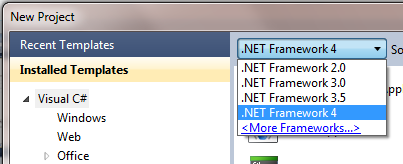
 Multi-Targeting Support - You can use VS2010 to create (target) .NET 2.0, 3.0, 3.5 or 4 applications. That means you can work on existing applications and get all the new IDE features while also working on new .NET 4 apps, all with the same IDE.
 - ASP.NET 4 and ASP.NET MVC 2 are included in the box. WebForms now lets you create clean markup (no more tables) that's semantically correct and CSS-friendly, even for "legacy" controls and clientids that you control. ViewState is way smaller and can be turned on and off with greater granularity. Chart controls are included as well. On the MVC 2 side, we've got Areas, Strongly-typed helpers, Templated Helpers, field validation in models, and more. Both MVC and WebForms get all the core ASP.NET 4 improvements like a smaller web.config, the new <%: %> encoding syntax, extensible output caching, preloading of web apps, session state compression and routing for SEO-friendly URLs.
- Windows Communication Foundation (WCF) gets easier with a better configuration experience for services (bothSOAP and REST) as well as new functionality around routing and discovery.
- Windows Workflow (WF) gets a massive speed increase, the flowchart services, and it's way easier to make custom services than before. It's all in System.Activities.
- Entity Framework 4 and WCF Data Services 4 (OData) - Lots of improvements in the Data space, particularly in the Entity Framework 4. There's POCO support for Self-Tracking Entities, a DDL Generation Provider for creating databases based on a model, as well as lots of improvements to the designer. Don't forget WCF Data Services, I blogged about how easy it is to implement OData recently when I made an API for StackOverflow.
- What's new in C# 4 - C# gets a lot of new features in version 4 (or Visual C# 2010 if you like) like Dynamic Support (that's the DLR, built right in), Type Equivalence, and Covariance and Contravariance which makes generics much more flexible.
- What's new in Visual Basic 2010 - Jonathan Aneja discusses the coevolution strategy, and new features like Implicit Line Continuation, Statement Lambdas, Auto-Implemented Properties, Collection Initializers and how VB uses the DLR (Dynamic Language Runtime).
- New C++ and MFC Features - What? C++? Oh, yes. Pete Brown recently dipped his feet back into C++ with VS2010 and was shocked to find how easy it was to make a Ribbon Application with MFC. In this article, Samit Kumar talks about some of the new C++0x (that's see plus plus oh ex) core language features as well as major improvements in the standard library. VS 2010 enables lambda expressions, the auto keyword, rvalue references, static_assert, nullptr and decltype. It's not your father's C++. Well, maybe it is, if your dad is a ninja.
- What's new in WPF - Pete Brown has a fantastic and deep blog post on all the new WPF4 features. There's speed updates, a better designer, Windows 7 and touch support, text is crystal clear (not blurry!), a new datagrid, pixel shaders, the Visual State Manager, WPF Tracing support in VS2010 and more.
- MEF, the Managed Extensibility Framework comes with .NET 4. You use MEF to create extensible, compose-able applications. You don't need to download anything, it's integral to the framework and it works anywhere you like, including WinForms, WPF, ASP.NET or Silverlight.
- F# is in the box - F# ships with Visual Studio 2010. There's a good Introduction to Functional Programming for .NET Developers you should check out to see how you can use F# and how it will augment and complement your current language of choice.
 Concurrency, Threading and Parallelism - Check out the Parallel Computing Dev Center and how PLinq, the Task Parallel Library and the Coordination Data Structures work. Understand how to apply parallel patterns with .NET 4 with this awesome whitepaper. There's also major improvements in the Profiling Tools, including a Concurrency Visualizer for seeing how Multithreaded apps really behave. View their threads and how those threads migrate across cores.
 - Team Foundation Server - Previously, installing TFS was, ahem, challenging. Today, I've seen people install TFS in 6 minutes with VS2010. Some say they can do it in 3. The point is, it's easy to install now along with lots more new features.
Also, there's a FREE e-Book called "Moving to Visual Studio 2010" that you might want to check out. It's an excerpt of a larger book that'll be coming from MSPress later this summer. It takes a interesting approach as it has three parts, moving from VS2003, moving from VS2005, and moving from VS2008. It's clever, actually. You start in the book on the version that you're currently on. If you're not familiar with versions like VS2008, you start at the beginning. Otherwise, you jump ahead. When you're done, you're ready to move to VS2010.
MSDN and Visual Studio 2010
When a new product launches, MSDN launches with updates and new features of its own. Here's a few things the folks at MSDN have been doing to support the launch.
- Better MSDN Search - Most people likely use a search engine to search MSDN, but if you do search from within MSDN, there are a number of new improvements. You can refine by source, saying only search blogs, or only search the library. There's also an OpenSearch provider so you can search the MSDN Library directly from within Windows itself.

MSDN Search also includes Metadata from the results to help you find right thing. For example, if a search turns up a CodePlex project, I can see type-specific details within search results:

- MSDN Subscriber Downloads Improvements - There's been lots of UX improvements including as-you-type filtering as well as filtering by platform (x64, etc) and language. I will very likely not need to download Quechua Windows, so now I don't need to see it.
- MSDN Library in Lightweight and ScriptFree - You can choose between three flavors of MSDN Library, Classic (the one with the treeview on the side), Lightweight (what I use) or ScriptFree. ScriptFree is great for mobile devices, and it's lightning fast anywhere. Lightweight is the new default and I like it because it features community annotations made to the library prominently on the left side as well as a tabbed interface for code sample languages. I blogged a preview of this work last year and included some charts and graphs showing the improvements in speed worldwide.

Category: